
CARE GUIDE-APPLIANCES 07-VIDEO DOOR BELL
EZVIZ EP3X
Tenant Usage + Upkeep Guide
1️⃣ Daily Usage – What Tenants MUST Follow
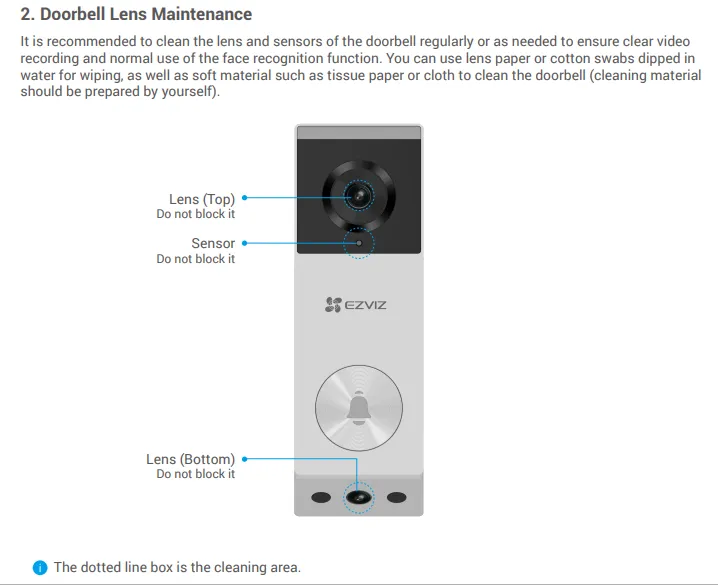
✔ 1. Keep the camera lens CLEAN and unobstructed
Wipe with a microfiber cloth.
Avoid fingerprints, dust, or water spots — they reduce clarity and night vision.
✔ 2. Press the bell button firmly — not repeatedly
One firm press = proper notification.
Repeated tapping:
Causes system delays
Causes app spam
Wears out the button prematurely
✔ 3. Use the doorbell ONLY for entry notification
Tenants must NOT use it as:
A peephole substitute
A two-way intercom for non-essential chat
✔ 4. Ensure WiFi connection is stable
EP3X relies on 2.4GHz WiFi.
Tenants should NOT turn off router or unplug power sources.
If the doorbell disconnects → notifications fail.
✔ 5. Inform landlord immediately if video feed fails
Tenants must never attempt:
Reset button
Re-pairing
Factory reset
Any unauthorized tampering causes data loss + reinstallation cost.
2️⃣ Weekly Care – Tenant Responsibilities
✔ 1. Clean the camera lens + infrared LEDs
Dust affects night vision and detection accuracy.
✔ 2. Check the area around the doorbell
Ensure:
No objects blocking view
No decorations covering device
No tape/stickers applied
No obstruction from shoe racks / furniture
✔ 3. Keep door area dry
If raining, wipe off moisture.
Water droplets on lens cause:
Lens blur
Motion detection errors
False alerts
3️⃣ What Tenants MUST NOT Do (Critical Rules)
❌ 1. Do NOT attempt to reset the doorbell
No pressing of:
Reset pinhole
Sync/pairing button
Removing device from mount
This breaks system pairing → reinstallation fee applies.
❌ 2. Do NOT cover or block the doorbell
Examples:
Decorative wreaths
Hanging laundry
Packed umbrellas
Shoe racks
Parcels placed too close
Obstruction = blind spots + motion detection failure.
❌ 3. Do NOT forcefully press, hit, or bang the doorbell
Causes:
Button failure
Cracked housing
Water damage through cracks
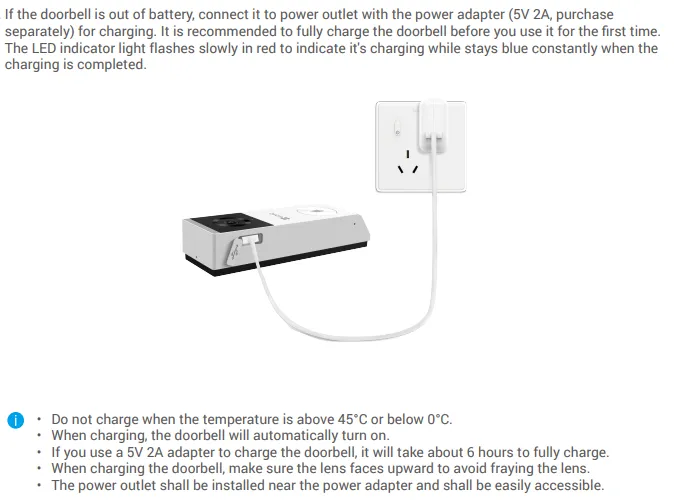
❌ 4. Do NOT unplug the doorbell power supply
If battery-powered → tenant must NEVER remove the battery cover.
❌ 5. Do NOT expose it to cleaning sprays
No chemicals, no alcohol wipes.
Use dry microfiber only.
4️⃣ Troubleshooting Guide
❗ 1. Not receiving notifications
Tenant checks only:
Phone NOT on silent
Notifications enabled
WiFi on
If still not working → inform landlord.
Tenant must NOT attempt reset or re-pairing.
❗ 2. Video feed blurry
Tenant action:
➡️ Clean lens with soft cloth
➡️ Ensure no steam/humidity buildup
➡️ Check nothing is blocking view
❗ 3. Night vision not working
Likely due to:
Dirty IR LEDs
Objects reflecting infrared
Strong external lights
Tenant action:
➡️ Clean lens
➡️ Remove blocking objects
If persists → inform landlord.
❗ 4. Doorbell not ringing
Possible reasons:
WiFi disruption
Press too light
Temporary app delay
Tenant action:
➡️ Press once firmly
➡️ Check WiFi is on
➡️ Wait 2–3 seconds for alert
If still no ring → inform landlord.
FOR FULL INSTRUCTIONS & MANUAL